City of Beringen: Modern telephony for 200+ employees via Microsoft Teams
City Beringen struggled with an outdated telephone system that was expensive to maintain and offered limited flexibility. With more and more employees working hybrid, there was a n…

Sven Antonissen | 365 Angels
Chief Angel
200+
Medewerkers
40%
Kostenbesparing
3 maanden
Implementatietijd
95%
Gebruikerstevredenheid
The challenge
City Beringen struggled with an outdated telephone system that was expensive to maintain and offered limited flexibility. With more and more employees working hybrid, there was a need for a modern telephony solution that worked seamlessly both in the office and at home. The existing infrastructure did not support mobile working, and adding new phone numbers was a time-consuming process.
The solution
365 Angels implemented Microsoft Teams Telephony with Operator Connect for the entire organization. All 200+ employees gained access to professional telephony directly from Microsoft Teams. We migrated all existing phone numbers to the new platform and configured intelligent call routes for various departments. The implementation was carried out in phases to ensure service continuity, with intensive training for all employees and IT staff.
The results
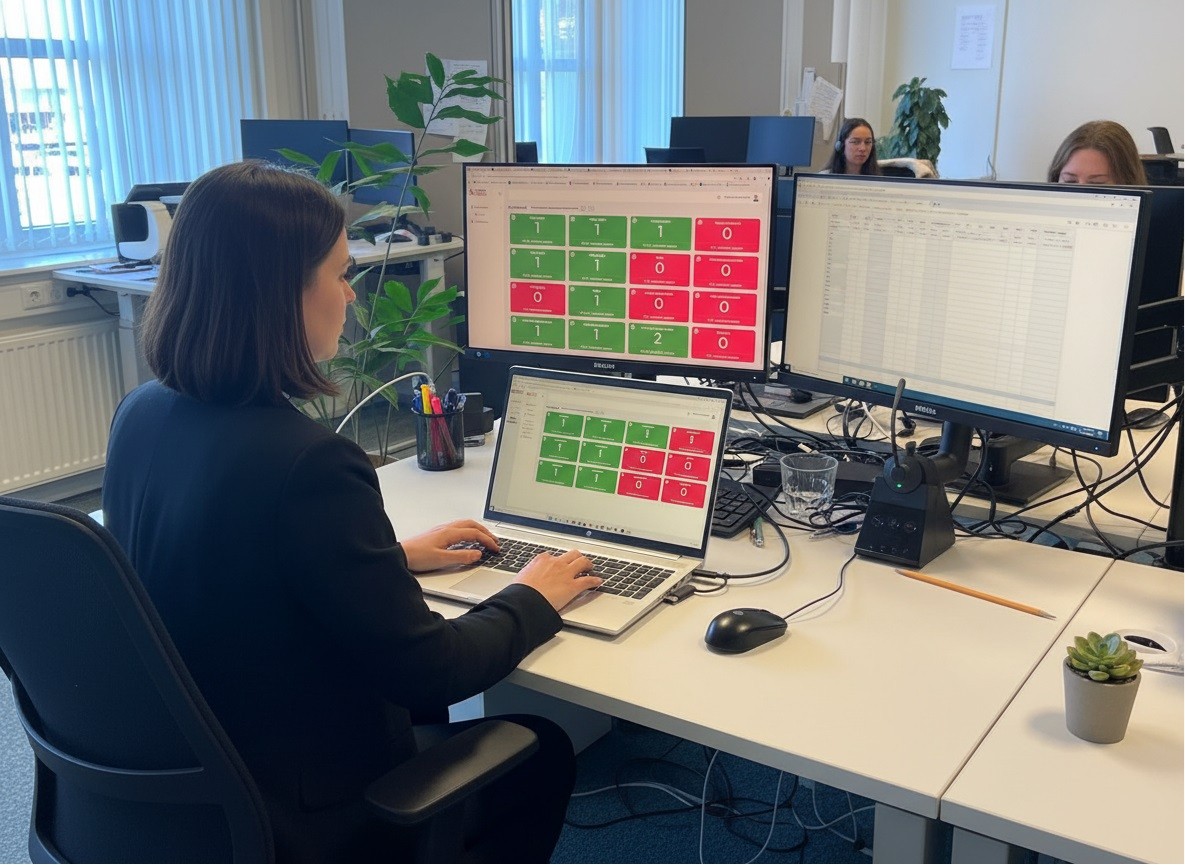
Within 3 months, the entire organization transitioned to Teams Telephony. Employees can now make and receive calls from any location with the same number. The IT department saves time monthly because management is entirely through the Teams Admin Center. The municipality achieves a 40% cost saving on telephony and has the flexibility to quickly add new employees or departments. Employee satisfaction has significantly increased due to the user-friendliness and integration with other Microsoft 365 tools. Through Teams Insight, the Customer Contact Center (KCC) has direct insight into the call queues of the various specialist teams. When we have a citizen on the line, we already know if we can transfer to the relevant specialist team. If we see that the specialist team is already in conversation or unavailable at the moment, we immediately create a callback request. If a colleague from the specialist team is available for calls, we transfer directly.
What the client says
Onorthodox? Wellicht. Ons KCC is minimaal bemand met maximaal drie collega’s, we gebruiken geen dure contactcenter software en onze succesrate bij doorverbinden ligt boven de 95%
Consultants involved





Written by
Sven Antonissen
Laden...Chief Angel
Sven Antonissen is Chief Angel bij 365 Angels en een gepassioneerde Microsoft 365-consultant met diepgaande expertise in cloud-transformatie en organisatorische digitalisering. Met zijn specialisatie in Teams, SharePoint en Power Platform helpt hij organisaties hun volledige potentieel uit de Microsoft 365-suite te benutten. Sven combineert technische kennis met een praktische benadering, waardoor complexe implementaties laagdrempelig en resultaatgericht worden uitgevoerd. Voor zijn klanten betekent dit niet alleen een naadloze technische omstelling, maar ook een duurzame cultuurverandering richting efficiëntie en samenwerking.
More success stories
Other client cases
Understanding Telephony Behavior and Accessibility with Clobba
The municipality of Sittard-Geleen needed more control over telephony behavior and accessibility, particularly within the Customer Contact Center (KCC). Functional administrators lacked insight into the use of Microsoft Teams telephony and could not effectively support business inquiries with data.
DKM Customs belt across borders
Being reachable by phone for all employees in Belgium, the Netherlands, England, Morocco, and Bulgaria via the Teams platform. The old telephone exchange was located in Belgium and in no way connected to the modern workplace. This is how the 365 Angels came into contact with Cats & Dogs, the supplier of the modern workplace at DKM Customs. This workplace is designed with Azure Virtual Desktop and Microsoft 365 apps, including Microsoft Teams. How do we integrate all these components? 365 Angels to the rescue!

From Tendfor KCC to Microsoft Teams Telephony with Dynamics 365 Contact Center
OVAM wanted to modernize its KCC environment. The existing Tendfor solution no longer met the desire to assist citizens faster, more personally, and scalably. Additionally, OVAM was looking for a closer integration with Dynamics 365 and a platform that intuitively supports employees and facilitates hybrid working.
Ready for your own transformation?
Let us help you with your digital transformation. Schedule a no-obligation conversation to explore the possibilities.
Schedule a meeting